No edit summary |
No edit summary |
||
| Line 22: | Line 22: | ||
<code><nowiki></attachments></nowiki></code> | <code><nowiki></attachments></nowiki></code> | ||
|- | |||
|Bar chart | |||
| | |||
| | |||
|- | |||
|BitBucket file | |||
| | |||
| | |||
|- | |- | ||
| style="" class="" |Book PDF link | | style="" class="" |Book PDF link | ||
| Line 38: | Line 46: | ||
|Link that is styled as a button | |Link that is styled as a button | ||
| style="" |<code><nowiki>{{ButtonLink|target=Main Page|label=click me!|format=blue}}</nowiki></code> | | style="" |<code><nowiki>{{ButtonLink|target=Main Page|label=click me!|format=blue}}</nowiki></code> | ||
|- | |- | ||
|[[wikipedia:Help:Displaying_a_formula#Chemistry|Chemical formula]] | |[[wikipedia:Help:Displaying_a_formula#Chemistry|Chemical formula]] | ||
| Line 62: | Line 62: | ||
<code><nowiki></syntaxhighlight></nowiki></code> | <code><nowiki></syntaxhighlight></nowiki></code> | ||
|- | |||
|Content card | |||
| | |||
| | |||
|- | |- | ||
| style="" class="" |[[Reference:ContainerFilter|Content Filter]] | | style="" class="" |[[Reference:ContainerFilter|Content Filter]] | ||
| Line 70: | Line 74: | ||
| style="width:380px;" |Form field for predefined page creation | | style="width:380px;" |Form field for predefined page creation | ||
| style="" |<code><nowiki>{{CreateInput|alignment=left|buttonlabel=Create}}</nowiki></code> | | style="" |<code><nowiki>{{CreateInput|alignment=left|buttonlabel=Create}}</nowiki></code> | ||
|- | |- | ||
| style="" class="" |Date | | style="" class="" |Date | ||
| Line 82: | Line 82: | ||
|Highlights a decision as a page property | |Highlights a decision as a page property | ||
| style="" |<code><nowiki>{{Decision|decision=Eat more veggies}}{{Decision|decision=Buy new car}}</nowiki></code> | | style="" |<code><nowiki>{{Decision|decision=Eat more veggies}}{{Decision|decision=Buy new car}}</nowiki></code> | ||
|- | |- | ||
|[[Extension/DrawioEditor|Diagram]] | |[[Extension/DrawioEditor|Diagram]] | ||
| Line 94: | Line 90: | ||
|Content within this section is excluded from the PDF export | |Content within this section is excluded from the PDF export | ||
| style="" |<code><nowiki><pdfexcludestart /></nowiki>Do not export this text<nowiki><pdfexcludeend /></nowiki></code> | | style="" |<code><nowiki><pdfexcludestart /></nowiki>Do not export this text<nowiki><pdfexcludeend /></nowiki></code> | ||
|- | |||
|External content | |||
| | |||
| | |||
|- | |||
|Five column layout | |||
| | |||
| | |||
|- | |||
|Four column layout | |||
| | |||
| | |||
|- | |- | ||
|[[mediawikiwiki:Help:Images#Gallery_syntax|Gallery]] | |[[mediawikiwiki:Help:Images#Gallery_syntax|Gallery]] | ||
| Line 105: | Line 113: | ||
<code><nowiki></gallery></nowiki></code> | <code><nowiki></gallery></nowiki></code> | ||
|- | |||
|GitHub | |||
| | |||
| | |||
|- | |||
|GitLab | |||
| | |||
| | |||
|- | |- | ||
|[[Extension/ContentDroplets/Icon|Icon]] | |[[Extension/ContentDroplets/Icon|Icon]] | ||
| Line 110: | Line 126: | ||
| style="" |<code><nowiki>{{Icon|bi bi-arrow-left-circle}}</nowiki></code> | | style="" |<code><nowiki>{{Icon|bi bi-arrow-left-circle}}</nowiki></code> | ||
|- | |- | ||
|[[Templates download/Messagebox|Important | |[[Templates download/Messagebox|Important message]] | ||
|Adds colored panel for a important note | |Adds colored panel for a important note | ||
| style="" |<code><nowiki>{{Textbox|boxtype=important|header=OMG|text=Important|icon=yes}}</nowiki></code> | | style="" |<code><nowiki>{{Textbox|boxtype=important|header=OMG|text=Important|icon=yes}}</nowiki></code> | ||
|- | |- | ||
| | |Include page excerpt | ||
| | | | ||
| | | | ||
|- | |||
|Jira | |||
| | |||
| | |||
|- | |||
|KPI gauge | |||
| | |||
| | |||
|- | |||
|KPI progress bar | |||
| | |||
| | |||
|- | |||
|KPI tile | |||
| | |||
| | |||
|- | |||
|KPI trend | |||
| | |||
| | |||
|- | |||
|Line chart | |||
| | |||
| | |||
|- | |- | ||
|[[Reference:BlueSpiceWhoIsOnline|List of users logged in]] | |[[Reference:BlueSpiceWhoIsOnline|List of users logged in]] | ||
| Line 129: | Line 169: | ||
|Display of mathematical formulas | |Display of mathematical formulas | ||
| style="" |<code><nowiki><math>\tfrac{2}{4}</math></nowiki></code> | | style="" |<code><nowiki><math>\tfrac{2}{4}</math></nowiki></code> | ||
|- | |- | ||
| style="background-color:rgb(248, 249, 250);text-align:start;box-sizing:border-box;border:1px solid rgb(162, 169, 177);break-inside:avoid;padding:8px;color:rgb(32, 33, 34);font-family:Lato, "sans-serif";font-size:13.9995px;font-style:normal;font-variant-ligatures:normal;font-variant-caps:normal;font-weight:400;letter-spacing:normal;orphans:2;text-indent:0px;text-transform:none;white-space:normal;widows:2;word-spacing:0px;-webkit-text-stroke-width:0px;text-decoration-thickness:initial;text-decoration-style:initial;text-decoration-color:initial;" class="" |[[Templates download/Messagebox|Message]] | | style="background-color:rgb(248, 249, 250);text-align:start;box-sizing:border-box;border:1px solid rgb(162, 169, 177);break-inside:avoid;padding:8px;color:rgb(32, 33, 34);font-family:Lato, "sans-serif";font-size:13.9995px;font-style:normal;font-variant-ligatures:normal;font-variant-caps:normal;font-weight:400;letter-spacing:normal;orphans:2;text-indent:0px;text-transform:none;white-space:normal;widows:2;word-spacing:0px;-webkit-text-stroke-width:0px;text-decoration-thickness:initial;text-decoration-style:initial;text-decoration-color:initial;" class="" |[[Templates download/Messagebox|Message]] | ||
| style="background-color:rgb(248, 249, 250);text-align:start;box-sizing:border-box;border:1px solid rgb(162, 169, 177);break-inside:avoid;padding:8px;color:rgb(32, 33, 34);font-family:Lato, "sans-serif";font-size:13.9995px;font-style:normal;font-variant-ligatures:normal;font-variant-caps:normal;font-weight:400;letter-spacing:normal;orphans:2;text-indent:0px;text-transform:none;white-space:normal;widows:2;word-spacing:0px;-webkit-text-stroke-width:0px;text-decoration-thickness:initial;text-decoration-style:initial;text-decoration-color:initial;" class="" |Adds text panel | | style="background-color:rgb(248, 249, 250);text-align:start;box-sizing:border-box;border:1px solid rgb(162, 169, 177);break-inside:avoid;padding:8px;color:rgb(32, 33, 34);font-family:Lato, "sans-serif";font-size:13.9995px;font-style:normal;font-variant-ligatures:normal;font-variant-caps:normal;font-weight:400;letter-spacing:normal;orphans:2;text-indent:0px;text-transform:none;white-space:normal;widows:2;word-spacing:0px;-webkit-text-stroke-width:0px;text-decoration-thickness:initial;text-decoration-style:initial;text-decoration-color:initial;" class="" |Adds text panel | ||
| style="" |<code><nowiki>{{Textbox|boxtype=neutral|header=|text=SDadad|icon=no}}</nowiki></code> | | style="" |<code><nowiki>{{Textbox|boxtype=neutral|header=|text=SDadad|icon=no}}</nowiki></code> | ||
|- | |||
|Metadata report | |||
| | |||
| | |||
|- | |- | ||
|[[Extension/ContentDroplets#Modal button|Modal button]] | |[[Extension/ContentDroplets#Modal button|Modal button]] | ||
| Line 142: | Line 182: | ||
| style="" |<code><nowiki>{{ModalDialog|title=I am a dialog|btnLabel=click me!|body=This is the text|footer=hello world}}</nowiki></code> | | style="" |<code><nowiki>{{ModalDialog|title=I am a dialog|btnLabel=click me!|body=This is the text|footer=hello world}}</nowiki></code> | ||
|- | |- | ||
| | |My open read confirmations | ||
| | | | ||
| | | | ||
|- | |||
|My open tasks | |||
| | |||
| | |||
|- | |- | ||
| | |My open workflows | ||
| | | | ||
| | | | ||
|- | |- | ||
|[[Templates download/Messagebox|Note]] | |[[Templates download/Messagebox|Note]] | ||
| Line 174: | Line 218: | ||
| style="" |<code><nowiki><bs:whoisonlinecount /></nowiki></code> | | style="" |<code><nowiki><bs:whoisonlinecount /></nowiki></code> | ||
|- | |- | ||
| | |Page activity log | ||
| | | | ||
| | | | ||
|- | |||
|Page excerpt | |||
| | |||
| | |||
|- | |||
|Page list | |||
| | |||
| | |||
|- | |- | ||
|PDF link | |PDF link | ||
| Line 189: | Line 241: | ||
| style="" |Embed preview of a PDF file | | style="" |Embed preview of a PDF file | ||
| style="" |<code><nowiki><pdf height="800">File:Raspberry_pi.pdf</pdf></code></nowiki> | | style="" |<code><nowiki><pdf height="800">File:Raspberry_pi.pdf</pdf></code></nowiki> | ||
|- | |||
|Pie chart | |||
| | |||
| | |||
|- | |- | ||
| style="" class="" |[[mediawikiwiki:Extension:Cognitive_Process_Designer#Usage|Process]] | | style="" class="" |[[mediawikiwiki:Extension:Cognitive_Process_Designer#Usage|Process]] | ||
| style="" |Embeds new or existing BPMN diagrams | | style="" |Embeds new or existing BPMN diagrams | ||
| style="" |<code><nowiki><bpmn process="Process name" height="300" toolbar="true" /></nowiki></code> | | style="" |<code><nowiki><bpmn process="Process name" height="300" toolbar="true" /></nowiki></code> | ||
|- | |- | ||
|[[Extension/ContentDroplets#Pros and cons|Pros and cons]] | |[[Extension/ContentDroplets#Pros and cons|Pros and cons]] | ||
| Line 218: | Line 270: | ||
| style="" |<code><nowiki><bs:searchinbook placeholder="Placeholder for the search text" book="Book name" /></nowiki></code> | | style="" |<code><nowiki><bs:searchinbook placeholder="Placeholder for the search text" book="Book name" /></nowiki></code> | ||
|- | |- | ||
| | |Sketch | ||
| | | | ||
| | | | ||
|- | |||
|Spreadsheet data | |||
| | |||
| | |||
|- | |- | ||
| | |Status badge | ||
| | | | ||
| | | | ||
|- | |- | ||
|[[Templates download/Messagebox|Success Message]] | |[[Templates download/Messagebox|Success Message]] | ||
| Line 233: | Line 289: | ||
|Tag cloud based on categories or search queries | |Tag cloud based on categories or search queries | ||
| style="" |<code><nowiki><bs:tagcloud renderer="list" store="category" /></nowiki></code> | | style="" |<code><nowiki><bs:tagcloud renderer="list" store="category" /></nowiki></code> | ||
|- | |- | ||
| style="" class="" |Tasklist | | style="" class="" |Tasklist | ||
| style="" |Adds a checklist item | | style="" |Adds a checklist item | ||
| style="" | | | style="" | | ||
|- | |||
|Three column layout | |||
| | |||
| | |||
|- | |- | ||
|[[Templates download/Messagebox|Tip]] | |[[Templates download/Messagebox|Tip]] | ||
|Adds colored panel for a tip | |Adds colored panel for a tip | ||
| style="" |<code><nowiki>{{Textbox|boxtype=tip|header=Tip|text=sfsadf|icon=yes}}</nowiki></code> | | style="" |<code><nowiki>{{Textbox|boxtype=tip|header=Tip|text=sfsadf|icon=yes}}</nowiki></code> | ||
|- | |||
|Two column layout | |||
| | |||
| | |||
|- | |- | ||
|[[Extension/BlueSpiceAvatars#Using the .3Cprofileimage.3E tag|User profile]] | |[[Extension/BlueSpiceAvatars#Using the .3Cprofileimage.3E tag|User profile]] | ||
| Line 261: | Line 321: | ||
|Adds a colored box for a warning note | |Adds a colored box for a warning note | ||
| style="" |<code><nowiki>{{Textbox|boxtype=warning|header=Hello|text=|icon=yes}}</nowiki></code> | | style="" |<code><nowiki>{{Textbox|boxtype=warning|header=Hello|text=|icon=yes}}</nowiki></code> | ||
|}<br /> | |}<br /> | ||
Revision as of 16:52, 23 October 2026
GlacierSkySapphire
Content droplets integrate with the Visual Editor to let users insert predefined content snippets.
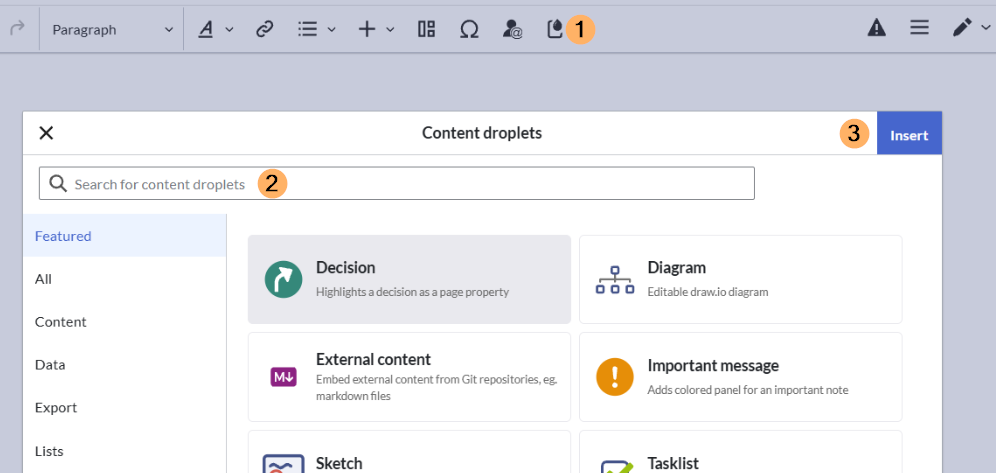
Add a Content droplet to a page

- Open the Content droplets menu.
- Search for the name of the Content droplet.
- Insert the Content droplet on the page.
Double confirmation:Some droplets open an inspector menu which contains another Insert button. Be sure to confirm that button as well.
Based on the type of droplet, you can continue with configuring the droplet as needed.
| Droplet | Description | Inserts the following in the page source: |
|---|---|---|
| Attachments | Area for organising attachments | <attachments title="Attachments area">
|
| Bar chart | ||
| BitBucket file | ||
| Book PDF link | PDF-download link to a book | {{BookPDFLink|book=Testbook|template=BlueSpice%20Book|label=Book PDF Link}}
|
| Book table of contents | Inserts the ToC of any book in a wiki page | <booknav book="Admin_manual" chapter="1" />
|
| Booklist | List of books based on a filter value. The value needs to be defined as a metadata value in the book settings | <bs:booklist filter="Author:WikiSysop" />
|
| Button | Link that is styled as a button | {{ButtonLink|target=Main Page|label=click me!|format=blue}}
|
| Chemical formula | Display of chemical formulas | <chem>H2O</chem>
|
| Circled number | Number in a circle with customizable color | {{CircledNumber|bgColor=black|fgColor=yellow|number=180}}
|
| Code | Highlighted section for code examples | <syntaxhighlight lang="css">
|
| Content card | ||
| Content Filter | Allows you to filter tables or lists. | <containerfilter />
|
| Create page | Form field for predefined page creation | {{CreateInput|alignment=left|buttonlabel=Create}}
|
| Date | Inserts a date. This can be used in combination with the content droplet Task list | 23 November 2023
|
| Decision | Highlights a decision as a page property | {{Decision|decision=Eat more veggies}}{{Decision|decision=Buy new car}}
|
| Diagram | Editable draw.io diagram | <drawio filename="Mydiagram">
|
| Exclude content in PDF | Content within this section is excluded from the PDF export | <pdfexcludestart />Do not export this text<pdfexcludeend />
|
| External content | ||
| Five column layout | ||
| Four column layout | ||
| Gallery | Displays an image gallery | <gallery>
|
| GitHub | ||
| GitLab | ||
| Icon | Inserts an icon | {{Icon|bi bi-arrow-left-circle}}
|
| Important message | Adds colored panel for a important note | {{Textbox|boxtype=important|header=OMG|text=Important|icon=yes}}
|
| Include page excerpt | ||
| Jira | ||
| KPI gauge | ||
| KPI progress bar | ||
| KPI tile | ||
| KPI trend | ||
| Line chart | ||
| List of users logged in | Pop-up with a list of all users that are currently logged in | <bs:whoisonlinepopup />
|
| Map | Locations can be marked on the map | {{Map|Munich ~ Hello there!|Munich, Germany}}
|
| Mathematical formula | Display of mathematical formulas | <math>\tfrac{2}{4}</math>
|
| Message | Adds text panel | {{Textbox|boxtype=neutral|header=|text=SDadad|icon=no}}
|
| Metadata report | ||
| Modal button | Configurable button which opens a customizable modal dialogue | {{ModalDialog|title=I am a dialog|btnLabel=click me!|body=This is the text|footer=hello world}}
|
| My open read confirmations | ||
| My open tasks | ||
| My open workflows | ||
| Note | Adds colored panel for a note | {{Textbox|boxtype=note|header=|text=sfsadfasfdsdaf|icon=yes}}
|
| Number of characters | Shows the number of characters or words in a wiki page | <bs:countcharacters />
|
| Number of files | Shows the number of all uploaded files | <bs:countfiles />
|
| Number of pages | Shows the number of pages | <bs:countarticles />
|
| Number of users | Shows the number of all users | <bs:countusers />
|
| Number of users logged in | Number of currently logged in users | <bs:whoisonlinecount />
|
| Page activity log | ||
| Page excerpt | ||
| Page list | ||
| PDF link | Link that downloads another wiki page as PDF | {{PDFLink|page=Main Page|template=BlueSpice|label=PDF Link}}
|
| PDF page break | Forces a page break at the set position during PDF export | <bs:uepagebreak />
|
| PDF preview | Embed preview of a PDF file | <pdf height="800">File:Raspberry_pi.pdf</pdf></code>
|
| Pie chart | ||
| Process | Embeds new or existing BPMN diagrams | <bpmn process="Process name" height="300" toolbar="true" />
|
| Pros and cons | Table for comparing pros and cons | {{ProConList|title-advantages=Advantages|title-disadvantages=Disadvantages|advantages=* It is cheap|disadvantages=* It is sold out}}
|
| QR code | Inserts a QR code into a wiki page | |
| Recent changes | List of recently changed pages | <recentchanges count="6" period="-" sort="time" showns="0" />
|
| Search field | Adds a search field to the page content | <bs:tagsearch type="wikipage" namespace="QM" />
|
| Search in a book | Allows to search in a book. | <bs:searchinbook placeholder="Placeholder for the search text" book="Book name" />
|
| Sketch | ||
| Spreadsheet data | ||
| Status badge | ||
| Success Message | Adds colored panel for a success note | {{Textbox|boxtype=success|header=Example|text=Message text|icon=yes}}
|
| Tag cloud | Tag cloud based on categories or search queries | <bs:tagcloud renderer="list" store="category" />
|
| Tasklist | Adds a checklist item | |
| Three column layout | ||
| Tip | Adds colored panel for a tip | {{Textbox|boxtype=tip|header=Tip|text=sfsadf|icon=yes}}
|
| Two column layout | ||
| User profile | A user profile will be included on this page | <bs:socialentityprofile username="WikiSysop" rendertype="Short" />
|
| Video | Embeds video from different external platforms (YouTube) | <embedvideo service="youtube">JILEkPu61Ao</embedvideo>
|
| Visited pages | List with visited pages | <bs:pagesvisited count="7" maxtitlelength="40" order="time" />
|
| Warning Message | Adds a colored box for a warning note | {{Textbox|boxtype=warning|header=Hello|text=|icon=yes}}
|