GlacierSkySapphire
PageExcerpts allows users to reuse content from any wiki page on another wiki page.
Define page excerpts
A page excerpt is created on a page with the Content droplet Page excerpt.

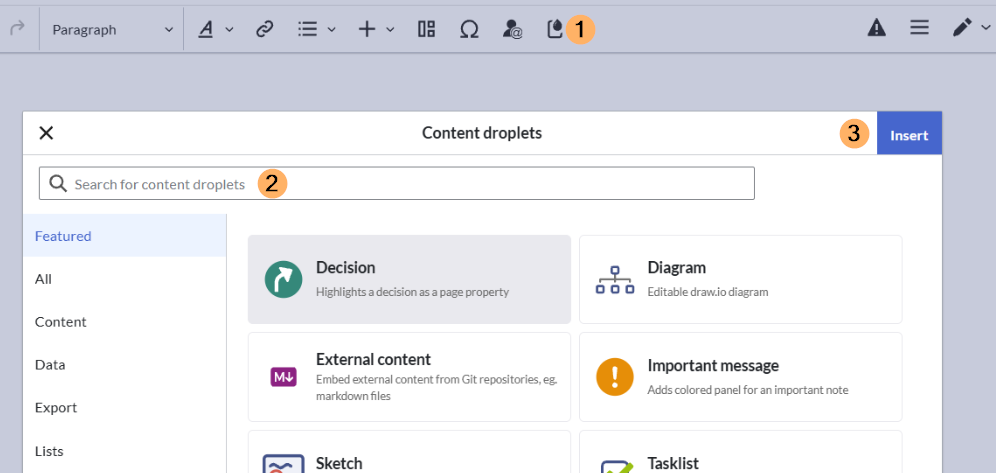
- Open the Content droplets menu.
- Search for "excerpt". Select the "Page excerpt" Content droplet.
- Insert the Content droplet on the page.
This inserts a container for a page excerpt. Next, you can edit the excerpt:
- Select the inserted excerpt and provide a mandatory name.
- Add your content into the excerpt.
Add additional excerpts with unique names on this page as needed.
Hide excerpts:If you mark an excerpt as "hidden", it will not appear in view mode of the excerpt page or the page that includes the excerpt.
Complex excerpts
If excerpts contain more than just wikitext, you can switch to source edit mode, to move the start and end tags of your excerpt.
- Insert the Page excerpt Content droplet where you want to start the excerpt and give it a name.
- Switch to source edit mode.
- Locate the tags
<excerpt-block name="myexcerpt" hidden="false"></excerpt-block>. Move the end tag</excerpt-block>where the excerpt should end.
Adding existing page excerpts to a page
- In the Content droplets menu, search for "excerpt".
- Select Include page excerpt.
- Enter the page name where the excerpt is defined.
- Provide the excerpt name.
- Click Done. If you activate Show panel, the excerpt will be shown with its panel name and border.