The Message droplet inserts a message box into a page. A message box highlights information, for example a note, a tip, or a warning. Each box type has its own colors and icon. The droplet is based on Template:Textbox.
Insert a message box
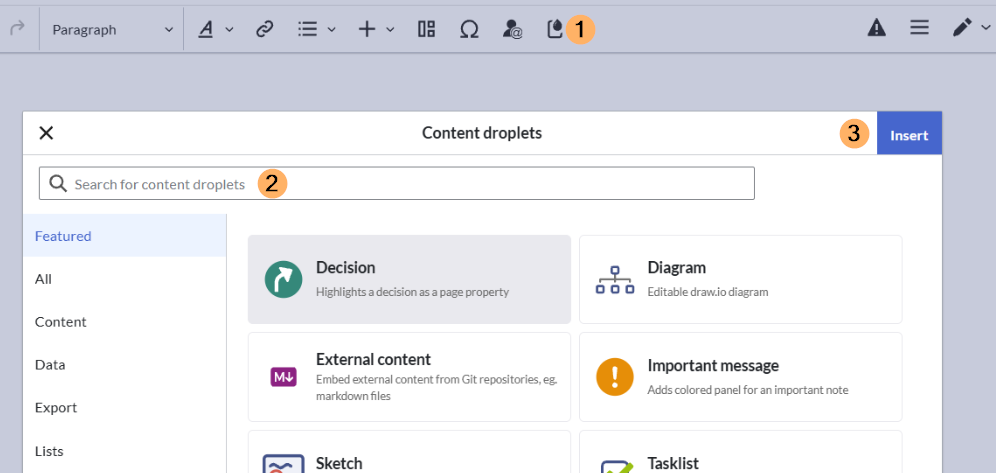
- Select the Content droplets action in the editor toolbar.
- Filter for the Content droplet Message.
- Insert the content droplet. An inspector menu opens.

The available message types are: Note, Important, Warning, Tip, Success, Message.

Parameters
| Parameter | Template parameter | Description |
|---|---|---|
| Show icon | icon
|
Shows the icon of the box type. Allowed value in wikitext: yes. If the parameter is empty, the box has no icon.
|
| Box type | boxtype
|
Determines the type of the box. Each type has its own border color, background color, and icon.
Allowed values in wikitext (case-sensitive): The colors are defined in |
| Headline | header
|
Shows a bold header above the text. The parameter is optional. If the parameter is empty, the box has no header. |
| Text | text
|
Sets the content of the box. The parameter accepts wikitext. |
Shared resource template
admin info
Shared resource template
Template: is a standard system template. The template and its style sheet are maintained centrally in the Shared resources wiki. Changes affect all wikis, unless the template also exists in an individual wiki.
To change the template for a single wiki only, copy the template to that wiki and make the changes there. Changes to the copy affect only the individual wiki.
By default, a message box spans the full width of the page. If an image appears directly before the box, the box is displayed below the image. The declaration clear:both in the .cd-textbox selector causes this behavior.
To display the box within the text flow in a single subwiki:
- Copy
Template:TextboxandTemplate:Textbox/styles.cssfrom the shared resources wiki to the subwiki. - In the subwiki, open the page
Template:Textbox/styles.cssfor editing. - In the
.cd-textboxselector, replace the declarationclear:bothwithoverflow:hidden. - Save the page.
The change applies to all message boxes in this subwiki.
Adjust the alignment
To change the alignment , make the same change to Template:Textbox/styles.css in the shared resources wiki.
Before:
.cd-textbox {
	padding: 14px;
	margin: 2em 0 1em 0;
	display: table;
	position:relative;
	width: 100%;
	clear:both;
}
After:
.cd-textbox {
	padding: 14px;
	margin: 2em 0 1em 0;
	display: table;
	position:relative;
	width: 100%;
	overflow:hidden;
}