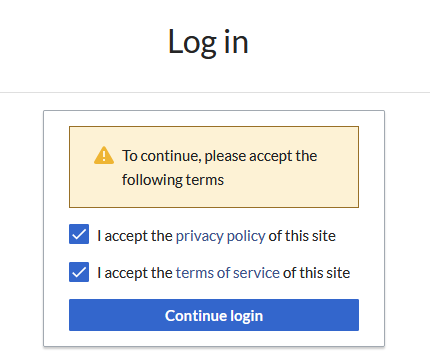
Created page with "==Terms of use pages== When users log into the wiki for the first time, they usually need to accept the privacy policy and the terms of service of the wiki. center|thumb|Terms of serviceIf these two pages do not yet exist in the wiki, the wiki shows a banner to wiki admins. Wiki admins need to create these two pages. The pages are also linked in the wiki footer. File:banner no privacy pagee..." |
No edit summary |
||
| Line 1: | Line 1: | ||
==Terms of use pages== | ==Terms of use pages== | ||
When users log into the wiki for the first time, they usually need to accept the privacy policy and the terms of service of the wiki. | When users log into the wiki for the first time, they usually need to accept the privacy policy and the terms of service of the wiki. | ||
[[File | [[File:Extension BlueSpicePrivacy Administration 1743425022229.png|center|thumb|Terms of service]]If these two pages do not yet exist in the wiki, the wiki shows a banner to wiki admins. Wiki admins need to create these two pages. The pages are also linked in the wiki footer. | ||
[[File:banner no privacy pagees.png|alt=Notification banner with redlinks to the missing privacy pages.|center|thumb|750x750px|Admins are prompted to create the privacy pages]] | [[File:banner no privacy pagees.png|alt=Notification banner with redlinks to the missing privacy pages.|center|thumb|750x750px|Admins are prompted to create the privacy pages]] | ||
| Line 15: | Line 15: | ||
* Grant request (click on <code>Approve</code>) | * Grant request (click on <code>Approve</code>) | ||
* Reject request (click on <code>Deny</code>) | * Reject request (click on <code>Deny</code>) | ||
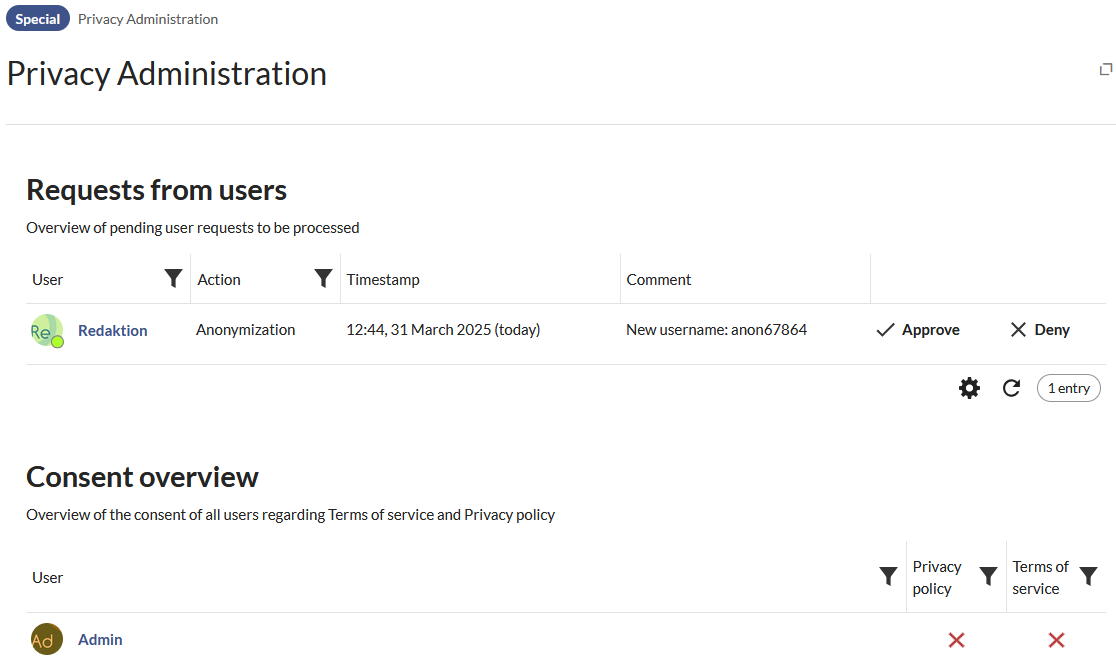
[[File | [[File:Extension BlueSpicePrivacy Administration 1743425205731.png|center|thumb|600x600px|Review privacy request]] | ||
In addition, administrators can see the status of the''Privacy policy consent'' for every user. | In addition, administrators can see the status of the''Privacy policy consent'' for every user. | ||
Revision as of 10:12, 16 November 2026
Terms of use pages
When users log into the wiki for the first time, they usually need to accept the privacy policy and the terms of service of the wiki.

If these two pages do not yet exist in the wiki, the wiki shows a banner to wiki admins. Wiki admins need to create these two pages. The pages are also linked in the wiki footer.

Account deletion or anonymization
Request to administrators
When a request for anonymization or account deletion is made, all users in the sysop group will receive an email notification.
They can then access the Privacy page located in Global actions > Administration or by navigating to Special:Privacy_Administration.
This pages lists the submitted requests. Administrators can review and approve or deny them.
- Grant request (click on
Approve) - Reject request (click on
Deny)

In addition, administrators can see the status of thePrivacy policy consent for every user.
Direct action by users
The wiki can be configured so that users can perform these actions immediately without approval from an administrator first (not possible in BlueSpice cloud). Requesting actions applies to:
- anonymization
- account deletion
Immediate action can be configured as $bsgPrivacyEnableRequests = false; in LocalSettings.php.
Configuration settings
The following settings can be made in the config manager of the wiki: {{#dpl:title=Manual:Extension/BlueSpiceConfigManager|include=#BlueSpicePrivacy}}