Created page with "{{DISPLAYTITLE:Status Badges}} A status badge is specially formatted colored text that indicates the status of an information unit. == Add a status badge == {{ContentDropletSelect|status}} This adds the preformatted tag with text Badge on the page. Use the open badge inspector to change the badge type. Replace the default text with the text you need. File:Extension StatusBadges insert.png|alt=Open Status Badge droplet with default text and color picker|center|thumb|3..." |
(No difference)
|
Latest revision as of 12:33, 13 November 2026
GlacierSkySapphire
A status badge is specially formatted colored text that indicates the status of an information unit.
Add a status badge

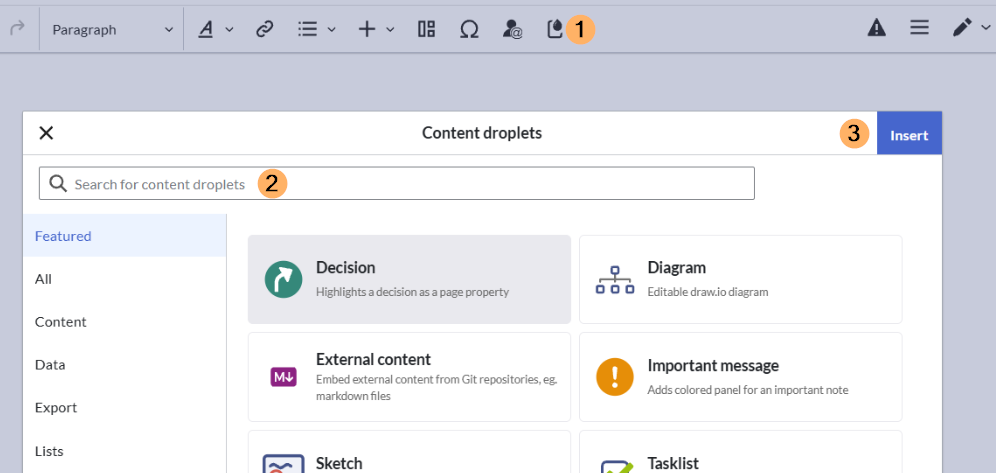
- Open the Content droplets menu.
- Search for "status".
- Insert the Content droplet on the page.
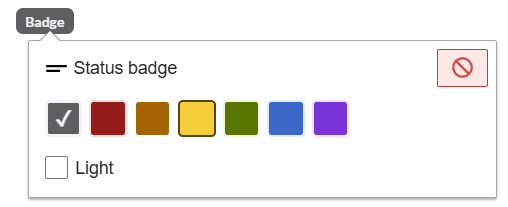
This adds the preformatted tag with text Badge on the page. Use the open badge inspector to change the badge type. Replace the default text with the text you need.

To quickly add another status badge, you can select the badge text, copy it (Ctrl+C) and paste it somewhere else on the page (Ctrl+V) . Select the duplicated badge and then edit its text and color.
Customizing
If you want to use a larger font-size in your wiki for badges, you can add the following rule to the page MediaWiki:Common.css (admin rights required):
/*status badge */
.status-badge {
    font-size:0.9em; /*default-size:0.75em */
}
Accessibility
- Use of color: Make sure to use label text for a status badge that clearly indicates the status. Do not rely on the color alone for conveying the meaning. For example, negative numbers should have a qualifier (
-) instead of just being formatted with a red background. WCAG #use-of-color - Screenreaders will read the badge as a combination of badge type ("Status"), color (e.g. "green") and label text via an
aria-label: "Status: green, complete". WCAG #text-alternatives