No edit summary |
No edit summary |
||
| Line 4: | Line 4: | ||
{{ContentDropletSelect}} | {{ContentDropletSelect}} | ||
{{Textbox|boxtype=note|icon=|header=Double confirmation:|text=Some droplets open an inspector menu which contains another ''Insert'' button. Be sure to confirm that button as well.|bgcolor=}} Based on the type of droplet, you can continue with configuring the droplet as needed. | {{Textbox|boxtype=note|icon=|header=Double confirmation:|text=Some droplets open an inspector menu which contains another ''Insert'' button. Be sure to confirm that button as well.|bgcolor=}} | ||
Based on the type of droplet, you can continue with configuring the droplet as needed. | |||
<containerfilter selector=".wikitable tr"> | |||
</containerfilter> | |||
{| class="wikitable" style="width: 100%;" | |||
! style="background-color:rgb(234, 236, 240);text-align:center;box-sizing:border-box;border:1px solid rgb(162, 169, 177);padding:8px;" class="" |'''Droplet''' | |||
! style="background-color:rgb(234, 236, 240);text-align:center;box-sizing:border-box;border:1px solid rgb(162, 169, 177);padding:8px;" class="" |'''Description''' | |||
! style="" |Inserts the following in the page source: | |||
|- | |||
|[[Attachments]] | |||
|Area for organising attachments | |||
| style="" |<code><nowiki><attachments title="Attachments area"></nowiki></code> | |||
<code>* <nowiki>[[Media:Financial_Sample.xlsx]]</nowiki></code> | |||
<code><nowiki></attachments></nowiki></code> | |||
|- | |||
| style="" class="" |Book PDF link | |||
| style="" |PDF-download link to a book | |||
| style="" |<code><nowiki>{{BookPDFLink|book=Testbook|template=BlueSpice%20Book|label=Book PDF Link}}</nowiki></code> | |||
|- | |||
| style="" class="" |Book table of contents | |||
| style="" |Inserts the ToC of any book in a wiki page | |||
| style="" |<code><nowiki><booknav book="Admin_manual" chapter="1" /></nowiki></code> | |||
|- | |||
|Booklist | |||
|List of books based on a filter value. The value needs to be defined as a metadata value in the book settings | |||
| style="" |<code><nowiki><bs:booklist filter="Author:WikiSysop" /></nowiki></code> | |||
|- | |||
|[[Templates download/ButtonLink|Button]] | |||
|Link that is styled as a button | |||
| style="" |<code><nowiki>{{ButtonLink|target=Main Page|label=click me!|format=blue}}</nowiki></code> | |||
|- | |||
|[[mediawikiwiki:Extension:CategoryTree|Categorytree]] | |||
|Selected categories are shown in a tree structure | |||
| style="" |<code><nowiki><categorytree>TestCat</categorytree></nowiki></code> | |||
|- | |||
|[[Extension/BlueSpiceChecklist|Checklist]] | |||
|List that allows to set a value in view mode | |||
| style="" |<code><nowiki><bs:checklist type="list" checked="true" list="Template:Status" value="Select status" /></nowiki></code> | |||
|- | |||
|[[wikipedia:Help:Displaying_a_formula#Chemistry|Chemical formula]] | |||
|Display of chemical formulas | |||
| style="" |<code><nowiki><chem>H2O</chem></nowiki></code> | |||
|- | |||
|Circled number | |||
|Number in a circle with customizable color | |||
| style="" |<code><nowiki>{{CircledNumber|bgColor=black|fgColor=yellow|number=180}}</nowiki></code> | |||
|- | |||
|[[Reference:SyntaxHighlight|Code]] | |||
|Highlighted section for code examples | |||
| style="" |<code><nowiki><syntaxhighlight lang="css"></nowiki></code> | |||
<code>.hi {background:blue;}</code> | |||
<code><nowiki></syntaxhighlight></nowiki></code> | |||
|- | |||
| style="" class="" |[[Reference:ContainerFilter|Content Filter]] | |||
| style="" |Allows you to filter tables or lists. | |||
| style="" |<code><nowiki><containerfilter /></nowiki></code> | |||
|- | |||
| style="width:190px;" class="" |[[Extension/InputBox|Create page]] | |||
| style="width:380px;" |Form field for predefined page creation | |||
| style="" |<code><nowiki>{{CreateInput|alignment=left|buttonlabel=Create}}</nowiki></code> | |||
|- | |||
|[[SMW queries#Content droplet .22Data query.22 v4.3.2B|Data query]] | |||
|Enables queries on content in the wiki | |||
| style="" |<code><nowiki><dataquery modified="+" format="ul" count="6" namespaces="Main" /></nowiki></code> | |||
|- | |||
| style="" class="" |Date | |||
| style="" |Inserts a date. This can be used in combination with the content droplet ''Task list'' | |||
| style="" |<code><datetime>2023-11-23</datetime></code> | |||
|- | |||
|[[Extension/ContentDroplets#Decision|Decision]] | |||
|Highlights a decision as a page property | |||
| style="" |<code><nowiki>{{Decision|decision=Eat more veggies}}{{Decision|decision=Buy new car}}</nowiki></code> | |||
|- | |||
| style="" class="" |Decision overview | |||
| style="" |Table with a list of decisions that were created by the ''Decision'' content droplet<br /> | |||
| style="" |<code><nowiki><decisionoverview namespaces=""></decisionoverview></nowiki></code> | |||
|- | |||
|[[Extension/DrawioEditor|Diagram]] | |||
|Editable draw.io diagram | |||
| style="" |<code><nowiki><drawio filename="Mydiagram"></nowiki></code> | |||
|- | |||
|Exclude content in PDF | |||
|Content within this section is excluded from the PDF export | |||
| style="" |<code><nowiki><pdfexcludestart /></nowiki>Do not export this text<nowiki><pdfexcludeend /></nowiki></code> | |||
|- | |||
|[[mediawikiwiki:Help:Images#Gallery_syntax|Gallery]] | |||
| Displays an image gallery | |||
| style="" |<code><nowiki><gallery></nowiki></code> | |||
|}<br /> | |||
Revision as of 16:42, 23 October 2026
GlacierSkySapphire
Content droplets integrate with the Visual Editor to let users insert predefined content snippets.
Add a Content droplet to a page

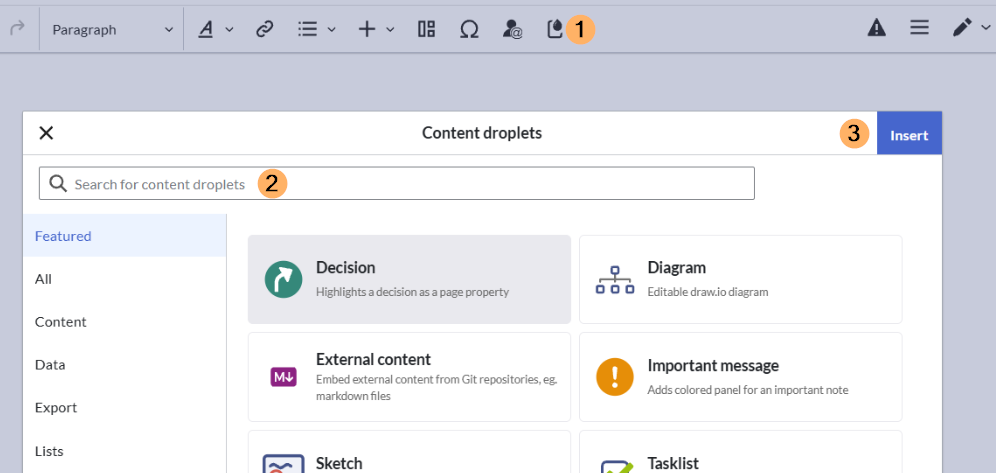
- Open the Content droplets menu.
- Search for the name of the Content droplet.
- Insert the Content droplet on the page.
Double confirmation:Some droplets open an inspector menu which contains another Insert button. Be sure to confirm that button as well.
Based on the type of droplet, you can continue with configuring the droplet as needed.
| Droplet | Description | Inserts the following in the page source: |
|---|---|---|
| Attachments | Area for organising attachments | <attachments title="Attachments area">
|
| Book PDF link | PDF-download link to a book | {{BookPDFLink|book=Testbook|template=BlueSpice%20Book|label=Book PDF Link}}
|
| Book table of contents | Inserts the ToC of any book in a wiki page | <booknav book="Admin_manual" chapter="1" />
|
| Booklist | List of books based on a filter value. The value needs to be defined as a metadata value in the book settings | <bs:booklist filter="Author:WikiSysop" />
|
| Button | Link that is styled as a button | {{ButtonLink|target=Main Page|label=click me!|format=blue}}
|
| Categorytree | Selected categories are shown in a tree structure | <categorytree>TestCat</categorytree>
|
| Checklist | List that allows to set a value in view mode | <bs:checklist type="list" checked="true" list="Template:Status" value="Select status" />
|
| Chemical formula | Display of chemical formulas | <chem>H2O</chem>
|
| Circled number | Number in a circle with customizable color | {{CircledNumber|bgColor=black|fgColor=yellow|number=180}}
|
| Code | Highlighted section for code examples | <syntaxhighlight lang="css">
|
| Content Filter | Allows you to filter tables or lists. | <containerfilter />
|
| Create page | Form field for predefined page creation | {{CreateInput|alignment=left|buttonlabel=Create}}
|
| Data query | Enables queries on content in the wiki | <dataquery modified="+" format="ul" count="6" namespaces="Main" />
|
| Date | Inserts a date. This can be used in combination with the content droplet Task list | 23 November 2023
|
| Decision | Highlights a decision as a page property | {{Decision|decision=Eat more veggies}}{{Decision|decision=Buy new car}}
|
| Decision overview | Table with a list of decisions that were created by the Decision content droplet |
<decisionoverview namespaces=""></decisionoverview>
|
| Diagram | Editable draw.io diagram | <drawio filename="Mydiagram">
|
| Exclude content in PDF | Content within this section is excluded from the PDF export | <pdfexcludestart />Do not export this text<pdfexcludeend />
|
| Gallery | Displays an image gallery | <gallery>
|