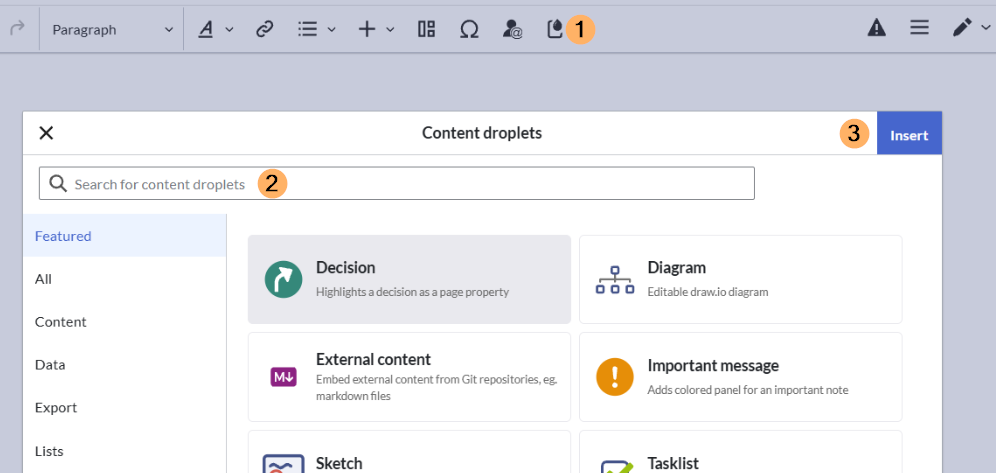
Created page with "'''To insert the Content droplet ''{{{name}}}'' on a page:''' # '''Open''' the menu ''Content droplets.'' # '''Filter''' for the Content droplet ''{{{name|}}}''. # '''Click''' ''Insert''. {{#ifeq:{{{inspector|}}}|1|An inspector menu opens.}} center|alt=Content droplets inspector menu|thumb|650x650px|Selecting a Content droplet <noinclude><templatedata> { "params": { "name": { "label": { "de": "Name des Content Droplets in V..." |
No edit summary |
||
| Line 1: | Line 1: | ||
# Open the '''Content droplets'''. | |||
# Filter for the Content droplet ''{{{name|}}}''. | |||
# | # Insert the content droplet. {{#ifeq:{{{inspector|}}}|1|An inspector menu opens.}} | ||
# | |||
# | |||
[[File:Insert_Content_Droplet.png|center|alt=Content droplets inspector menu|thumb|650x650px|Selecting a Content droplet]] | [[File:Insert_Content_Droplet.png|center|alt=Content droplets inspector menu|thumb|650x650px|Selecting a Content droplet]] | ||
Revision as of 13:06, 23 October 2026
- Open the Content droplets.
- Filter for the Content droplet '.
- Insert the content droplet.

First steps for adding content droplets
| Parameter | Description | Type | Status | |
|---|---|---|---|---|
| Name of the Content Droplet in VE | name | no description | Unknown | suggested |
| has inspector window | inspector | no description
| Boolean | suggested |
| Screenshot | file | no description | File | optional |