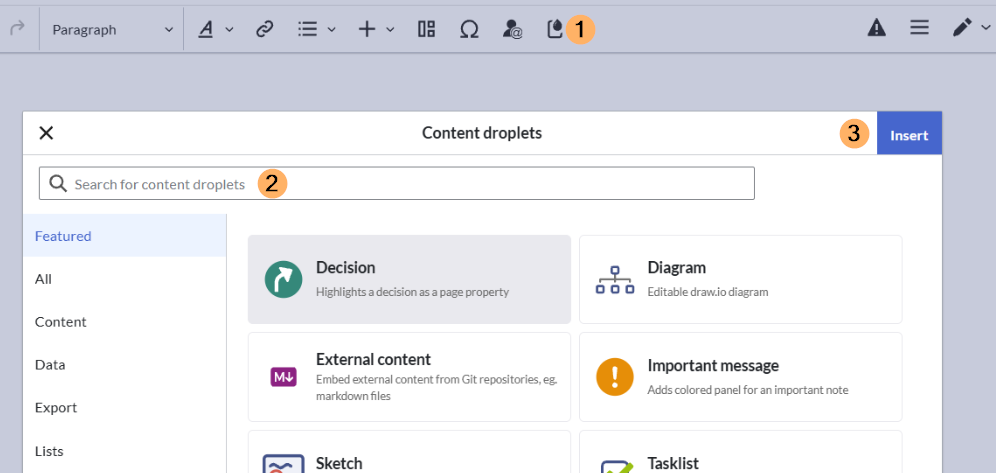
Created page with "Content droplets integrate with the Visual Editor to let users insert predefined content snippets. == Add a droplet to a page == {{ContentDropletSelect}} # '''Click''' the Content droplets icon in the editor toolbar or type <code><nowiki><<</nowiki></code>. # '''Search''' for a droplet name in the search bar of the droplets menu or browse the droplets by category.File:Droplet_menu.png|none|alt=Content Droplets menu|thumb|550x550px|Content D..." |
No edit summary |
||
| Line 3: | Line 3: | ||
== Add a droplet to a page == | == Add a droplet to a page == | ||
{{ContentDropletSelect}} | {{ContentDropletSelect}} | ||
{{Textbox|boxtype=note|icon=|text=Some droplets open an inspector menu which contains another ''Insert'' button. Be sure to confirm that button as well.|bgcolor=}} Based on the type of droplet, you can continue with configuring the droplet as needed. | {{Textbox|boxtype=note|icon=|text=Some droplets open an inspector menu which contains another ''Insert'' button. Be sure to confirm that button as well.|bgcolor=}} Based on the type of droplet, you can continue with configuring the droplet as needed. | ||
Revision as of 16:34, 23 October 2026
GlacierSkySapphire
Content droplets integrate with the Visual Editor to let users insert predefined content snippets.
Add a droplet to a page

- Open the Content droplets menu.
- Search for the name of the Content droplet.
- Insert the Content droplet on the page.
{{{header}}}Some droplets open an inspector menu which contains another Insert button. Be sure to confirm that button as well.
Based on the type of droplet, you can continue with configuring the droplet as needed.