Created page with "<status color="green" light="true">done</status><br> {{DISPLAYTITLE:User profile}} A Profile is automatically created when a user logs in for the first time. Links to a user's name in the wiki lead to the user's Profile page. For example, links can appear in the title area of a wiki page or in a user mention. Users can edit their own profile information. ==Profile page== File:user-profile.png|alt=Profile page with options for changing the profile image and editing prof..." |
No edit summary |
||
| (2 intermediate revisions by the same user not shown) | |||
| Line 1: | Line 1: | ||
A Profile is automatically created when a user logs in for the first time. Links to a user's name in the wiki lead to the user's Profile page. For example, links can appear in the title area of a wiki page or in a user mention. Users can edit their own profile information. | A Profile is automatically created when a user logs in for the first time. Links to a user's name in the wiki lead to the user's Profile page. For example, links can appear in the title area of a wiki page or in a user mention. Users can edit their own profile information. | ||
==Profile page== | ==Profile page== | ||
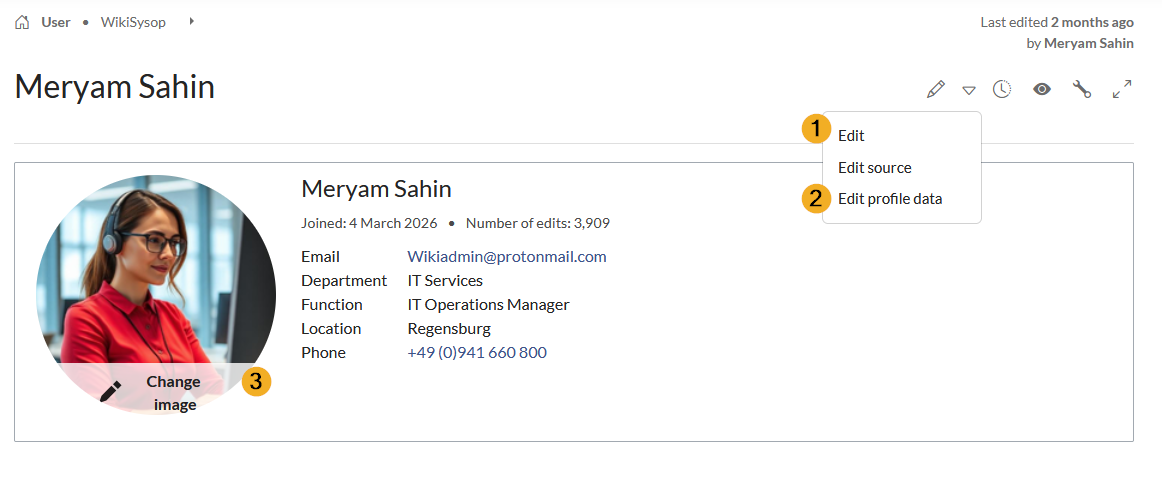
[[File:user-profile.png|alt=Profile page with options for changing the profile image and editing profile information|center|thumb|750x750px|Profile page]] | [[File:user-profile.png|alt=Profile page with options for changing the profile image and editing profile information|center|thumb|750x750px|Profile page]] | ||
To change the profile image, select '''Change image''' and choose one of the following options: | To change the profile image, select (3) '''Change image''' and choose one of the following options: | ||
* '''Generate new avatar''' creates an avatar image. Any previously uploaded image is deleted. To use it again, upload it again. | * '''Generate new avatar''' creates an avatar image. Any previously uploaded image is deleted. To use it again, upload it again. | ||
* '''Upload a new image''' uploads an image for the profile. <br> | * '''Upload a new image''' uploads an image for the profile. <br> | ||
Users can edit their own profile data directly on the Profile page. The available profile fields can be defined in the server configuration. <br> | Users can edit their own profile data (2) directly on the Profile page. The available profile fields can be defined in the server configuration. <br> | ||
Additional free-text content can be added below the profile information. | Additional free-text content can be added below the profile information (1). | ||
==Display a Profile on a wiki page== | ==Display a Profile on a wiki page== | ||
The '''User profile''' content droplet displays a user's profile information on any wiki page. | The '''User profile''' content droplet displays a user's profile information on any wiki page. <br> | ||
'''To insert the User profile content droplet:''' | '''To insert the User profile content droplet:''' | ||
# Enter the '''User'''. | # Enter the '''User'''. | ||
| Line 21: | Line 18: | ||
* '''Orientation''': Sets the profile information to '''horizontal''' or '''vertical'''. | * '''Orientation''': Sets the profile information to '''horizontal''' or '''vertical'''. | ||
* '''Displayed profile information''': Defines which profile information is shown. | * '''Displayed profile information''': Defines which profile information is shown. | ||
==Default content on Profile pages== | ==Default content on Profile pages== | ||
By default, each Profile page contains the '''Userpage standard content''' template. Wiki administrators can use this template to define content displayed on all Profile pages. <br> | By default, each Profile page contains the '''Userpage standard content''' template. Wiki administrators can use this template to define content displayed on all Profile pages. <br> | ||
If the template contains administrator-defined content, inform users not to delete the template from their Profile page. | If the template contains administrator-defined content, inform users not to delete the template from their Profile page. | ||
Latest revision as of 10:27, 5 November 2026
A Profile is automatically created when a user logs in for the first time. Links to a user's name in the wiki lead to the user's Profile page. For example, links can appear in the title area of a wiki page or in a user mention. Users can edit their own profile information.
Profile page

To change the profile image, select (3) Change image and choose one of the following options:
- Generate new avatar creates an avatar image. Any previously uploaded image is deleted. To use it again, upload it again.
- Upload a new image uploads an image for the profile.
Users can edit their own profile data (2) directly on the Profile page. The available profile fields can be defined in the server configuration.
Additional free-text content can be added below the profile information (1).
Display a Profile on a wiki page
The User profile content droplet displays a user's profile information on any wiki page.
To insert the User profile content droplet:
- Enter the User.
- Configure the display options.
- Select Insert.
The available options include:
- User: Specifies the user whose profile information is displayed.
- Framed: Adds a frame around the profile information.
- Orientation: Sets the profile information to horizontal or vertical.
- Displayed profile information: Defines which profile information is shown.
Default content on Profile pages
By default, each Profile page contains the Userpage standard content template. Wiki administrators can use this template to define content displayed on all Profile pages.
If the template contains administrator-defined content, inform users not to delete the template from their Profile page.